How to: Understand the data structure and set up a data donation for ChatGPT and Character.AI
Hey everyone! Data donation is fast becoming a go-to method in communication science, so I figured this little tutorial about chatbot data donations might help. I’ll cover what the data actually looks like inside the data download packages (DDPs) of two popular AI chatbot platforms (ChatGPT and Character.AI) and how to set up the uploader, the blueprints, and the redaction and extraction of the files.
Importantly, I’m not claiming to have found the best way to do all this, so I’d also recommend reading your uploader tool’s documentation carefully and thinking about what data you actually need from your participants to answer your research questions—understanding the data structure (which is what this post is here to help with) is a big part of that. I use University of Zurich’s Data Donation Module, which was developed by Thomas Friemel and Nico Pfiffner.
This post is structured along the questions that popped up when I started working on my own project that applies the method.
Note: All example chatlogs below are my own fictional test conversations — no real participant data.
It varies. I tested it a few times, and in my case, it usually took at least a week to arrive (sometimes longer) for both ChatGPT and Character.AI. Be aware of that timeframe and build it into your study timeline: participants can’t donate anything until their package is ready.
Important: the user’s download link typically expires after 7 days. So, tell your participants to download their package as soon as it’s ready! If they miss that window, the link dies and they have to request the whole thing again — which would probably mean a drop-out.
The thing I struggled with most when starting out was simply understanding what the data looks like. I couldn’t find any documentation on how ChatGPT and Character.AI exports are structured, or what the content inside the JSON files looks like, so that’s what I want to share first.
ChatGPT
ChatGPT exports come in a .zip file containing the following files:
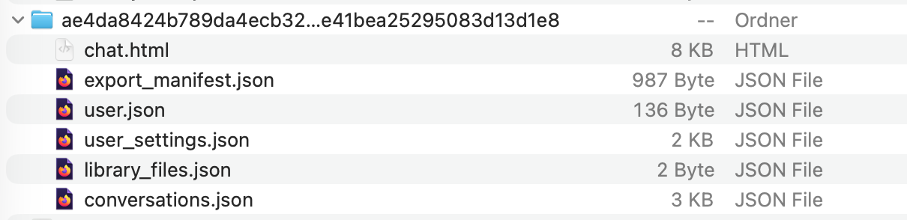
For export on the DDM, we are using the “conversations.json” file. For my project, the other .json files and .html are not relevant and therefore will not be touched by the uploader later.
How is conversations.json structured, and what does it contain?
Importantly, the messages we’re after in conversations.json are NOT flat. The file has two levels.
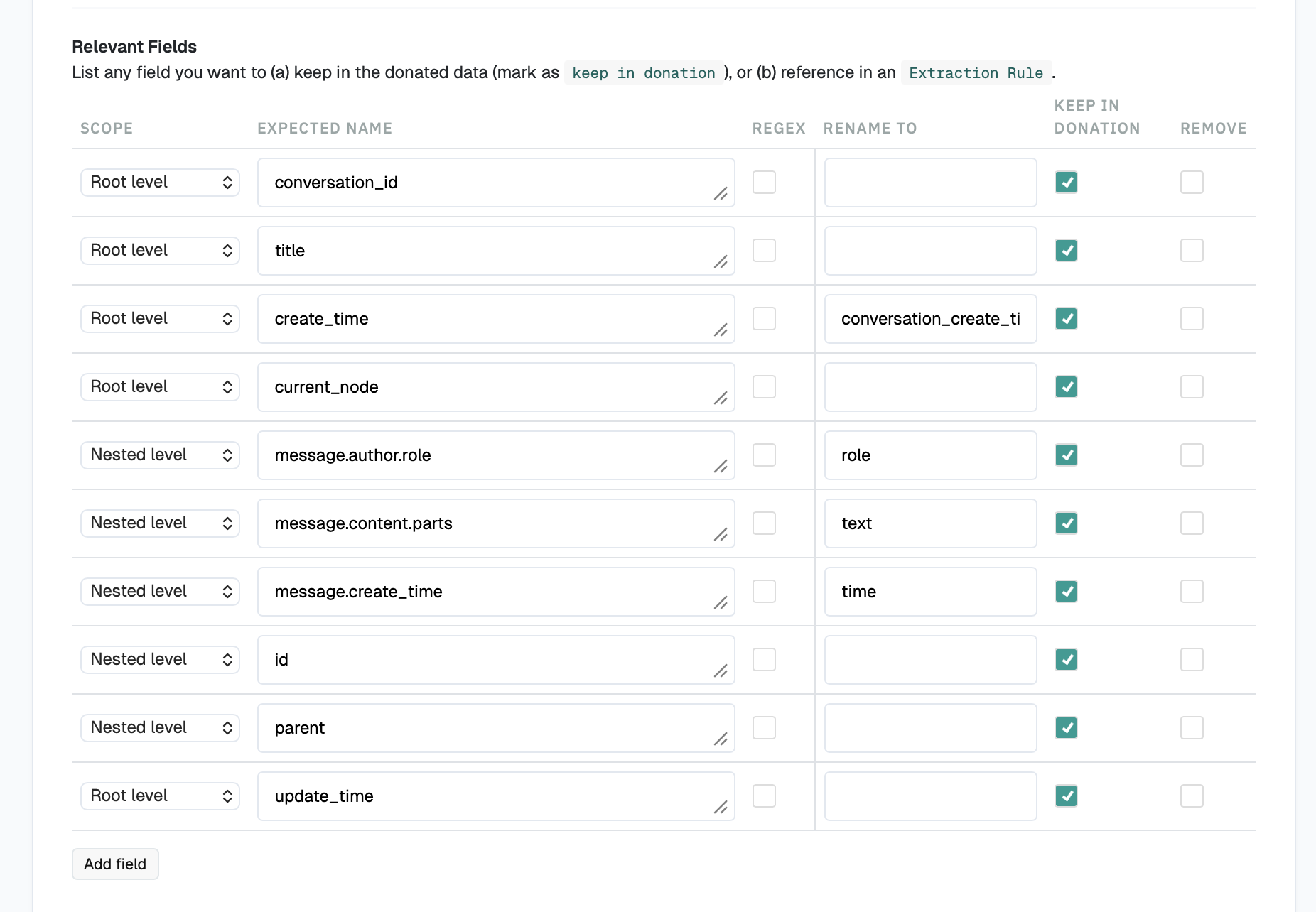
Level 1 (the top level) is a flat array of conversations—one object per conversation (which I also call a “session”). The fields worth keeping here:
- conversation_id (the session)
- title (the title of the session)
- create_time → conversation_create_time
- current_node
- update_time (optional)
Level 2 lives inside “mapping”: the messages within a conversation are not a flat list but a node tree (parents and children). The tree exists because users can edit or regenerate their messages, which branches the thread—so the conversation is actually nested. The fields worth keeping here:
- message.author.role (chatbot vs. user)
- message.content.parts (actual message)
- message.create_time
- id
- parent
Here’s what conversations.json actually looks like—a test conversation about “Spaghetti” that I ordered and downloaded from ChatGPT:
[
  {
    "conversation_id": "6a3e6086-db68-83eb-9107-74d53c073805",
    "conversation_template_id": null,
    "create_time": 1782472844.062441,
    "current_node": "575e4dff-0a34-47c5-a7bd-41c3215b4530",
    "default_model_slug": "auto",
    "id": "6a3e6086-db68-83eb-9107-74d53c073805",
    "is_archived": false,
    "is_do_not_remember": false,
    "is_read_only": null,
    "is_starred": null,
    "is_study_mode": false,
    "mapping": {
      "575e4dff-0a34-47c5-a7bd-41c3215b4530": {
        "id": "575e4dff-0a34-47c5-a7bd-41c3215b4530",
        "message": {
          "author": { "name": null, "role": "assistant" },
          "content": {
            "content_type": "text",
            "parts": [
              "🍝 Spaghetti!\n\nA simple, classic spaghetti recipe:\n\n**Ingredients**\n- 8 oz (225 g) spaghetti\n- 2 tbsp olive oil\n- 2–3 cloves garlic, minced\n- 1 can (14–15 oz / 400 g) crushed tomatoes\n- Salt and black pepper\n- Fresh basil (optional)\n- Grated Parmesan (optional)\n\n**Instructions**\n1. Cook the spaghetti in salted boiling water until al dente.\n2. While it cooks, heat the olive oil and gently sauté the garlic for about 30 seconds.\n3. Add the crushed tomatoes, season with salt and pepper, and simmer for 10–15 minutes.\n4. Drain the pasta, reserving a little pasta water.\n5. Toss the spaghetti with the sauce, adding a splash of pasta water if needed.\n6. Top with basil and Parmesan, if desired.\n\nOr, if you were just saying \"spaghetti\" for fun:\n\n**Spaghetti. Spaghetti.** 🍝😄"
            ]
          },
          "create_time": 1782469978.762466,
          "id": "575e4dff-0a34-47c5-a7bd-41c3215b4530",
          "metadata": {
            "content_references": [],
            "instant_answer_used": true,
            "model_slug": "gpt-5-5",
            "parent_id": "cbde6361-02d0-4e73-aa18-8e049a902fde"
          }
        },
        "parent": "cbde6361-02d0-4e73-aa18-8e049a902fde"
      },
      "cbde6361-02d0-4e73-aa18-8e049a902fde": {
        "id": "cbde6361-02d0-4e73-aa18-8e049a902fde",
        "message": {
          "author": { "name": null, "role": "user" },
          "content": { "content_type": "text", "parts": [ "Spaghetti" ] },
          "create_time": 1782472843.135,
          "id": "cbde6361-02d0-4e73-aa18-8e049a902fde",
          "metadata": { "serialization_metadata": { "custom_symbol_offsets": [] } }
        },
        "parent": "client-created-root"
      },
      "client-created-root": {
        "id": "client-created-root",
        "message": null,
        "parent": null
      }
    },
    "memory_scope": "global_enabled",
    "pinned_time": null,
    "plugin_ids": null,
    "title": "Spaghetti Recipe",
    "update_time": 1782472845.270025,
    "voice": null
  }
]
Character.AI
Character.AI is a different story. For one, users can chat with multiple chatbots—and the bots can message you unprompted. I could go idle for two weeks and still receive new messages from a chatbot in one of my chats.
Character.AI exports come in a .zip file containing the following files:

As you can see, everything sits inside a “data” folder. The JSON file that matters for chatlog analysis is message.json.
How is message.json structured, and what does it contain?
The message.json structure is much simpler than the ChatGPT one. It’s a flat list, and all the important content lives on a single level:
- chat_id (the conversation or session)
- candidate_id (identifier of a chat message)
- raw_content (the message)
- create_time (when the message was created/sent)
- tti_image_rel_path (path to an image in the chat, if any—otherwise null)
What makes Character.AI chatlogs a bit of a pain is that there’s no field defining user vs. chatbot turns—nothing like ChatGPT’s explicit author.role (assistant vs. user). You have to infer it. Usually, on Character.AI the chatbot sends the first message, and that opening message often includes its name (which is handy if the specific character matters to your research question—a celebrity, a fictional character, and so on).
Beyond that tell, you have to infer user vs. chatbot turns from behavior. In a live, ongoing session, bot replies usually arrive within seconds of the user’s message, which you can see in the timestamps. But that cue only holds while the chat is actively used by the user: once someone stops replying, the bot’s unprompted follow-ups can arrive days later, so the quick-reply heuristic breaks across those gaps.
candidate_id also contains a partial cue for spotting chatbot messages. Some chatbot messages carry chatcmpl, while user messages and various other messages are marked with plain IDs. So, I believe chatcmpl = chatbot message could be a reliable signal. Importantly (and annoyingly), however, not every chatbot message has it. The chatbot’s greetings and some replies come through as plain IDs too, so its absence doesn’t automatically mean a user message. Therefore, you may use chatcmpl to identify chatbot turns that have it, then fall back on the other cues (the chatbot’s opening message, *asterisks* used in the narration, and reply timing) for the rest.
Finally, the rows are not in conversational order. You have to sort them yourself by create_time before doing anything else.
Here’s an excerpt of what message.json looks like (a few messages from a couple of chats):
[
  {
    "chat_id": "2f3fd48c-e082-4131-a04d-ffd2e17de31d",
    "candidate_id": "8ce73fc6-5221-40fc-b426-373517f0e638",
    "raw_content": " hello",
    "create_time": "2026-07-19 13:23:46.364273+00:00",
    "tti_image_rel_path": null
  },
  {
    "chat_id": "2f3fd48c-e082-4131-a04d-ffd2e17de31d",
    "candidate_id": "dc08751f-8beb-4a78-8593-66252be38c71",
    "raw_content": "*Elon looks up from his monitor, acknowledging the greeting*\n\n\"Hey there.\" *He takes off his sunglasses...* \"What's on your mind?\"",
    "create_time": "2026-07-19 13:23:46.439823+00:00",
    "tti_image_rel_path": null
  },
  {
    "chat_id": "2f3fd48c-e082-4131-a04d-ffd2e17de31d",
    "candidate_id": "chatcmpl-4ce05632624ede1c704cdd1cc6a84829",
    "raw_content": "*Elon adjusts his sunglasses while sitting in a SpaceX mission control chair...* \"Ahh, just watching Starship SN24's latest test flight...\"",
    "create_time": "2026-07-19 13:22:33.921219+00:00",
    "tti_image_rel_path": null
  },
  {
    "chat_id": "2f3fd48c-e082-4131-a04d-ffd2e17de31d",
    "candidate_id": "9a4c7163-eb9b-4d0c-a451-5f3a580db4f9",
    "raw_content": "I am Elon Reeve Musk . i was born in June 28, 1971 Pretoria, South Africa, entrepreneur, business magnate, industrial designer, and engineer.",
    "create_time": "2026-07-19 13:22:25.478469+00:00",
    "tti_image_rel_path": null
  },
  {
    "chat_id": "617ade27-21d9-4121-a9b5-da1197b33c16",
    "candidate_id": "96216bda-e4ae-47e3-9113-0c10235aa0d5",
    "raw_content": "Hello Dear! My name is Arinna Grande, i'm a Singer and Have Many Albums! ...",
    "create_time": "2026-07-19 13:24:49.001408+00:00",
    "tti_image_rel_path": null
  }
  // … remaining messages omitted for brevity
]
ChatGPT
Given ChatGPT’s data structure, we need to make sure participants see a readable display of their data—not the raw “mapping,” where the messages and everything else are garbled together.
The nice thing about the DDM is that (depending on your donation target’s data structure) participants can scroll through all their conversations (or sessions), review them, and choose which ones to donate.
Setting up the uploader itself is fairly self-explanatory, so I’ll focus on the nitty-gritty: the blueprint extraction configuration.
First, enter the file name. For ChatGPT, that’s conversations.json.
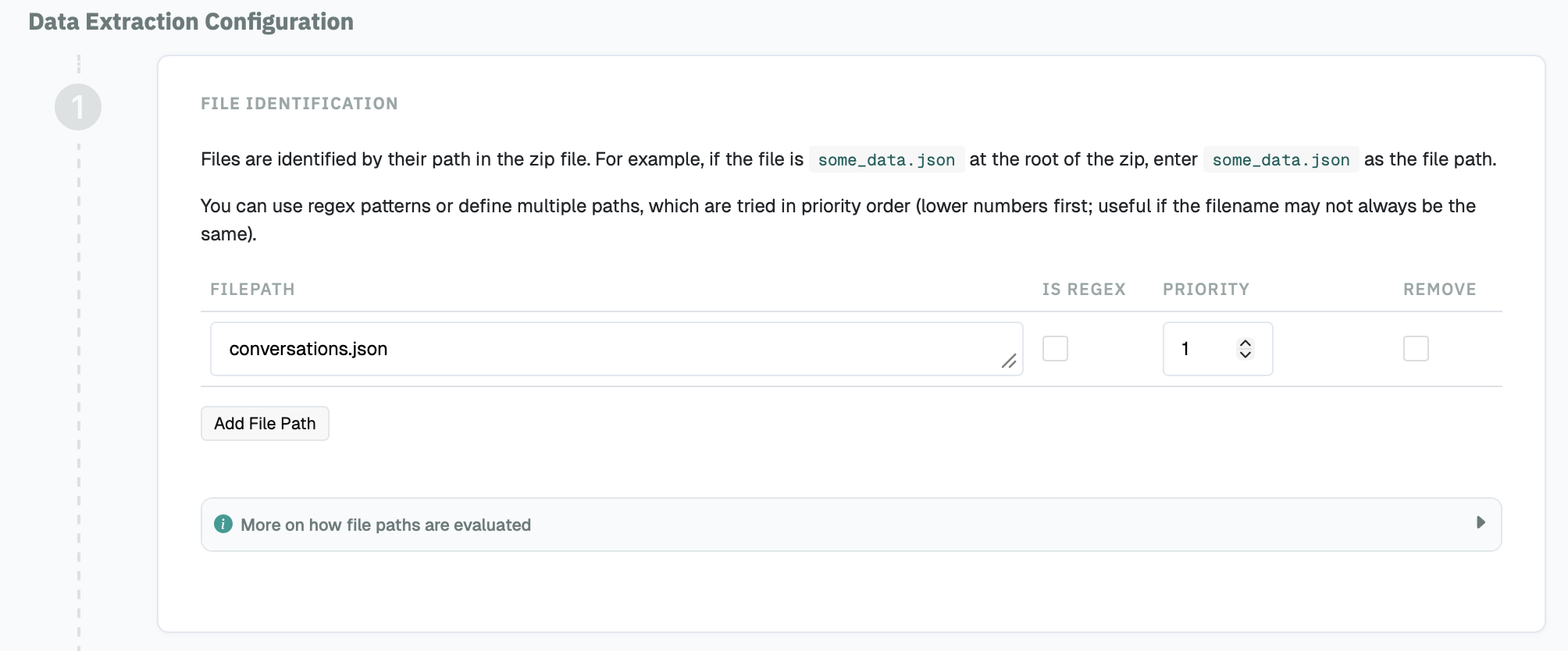
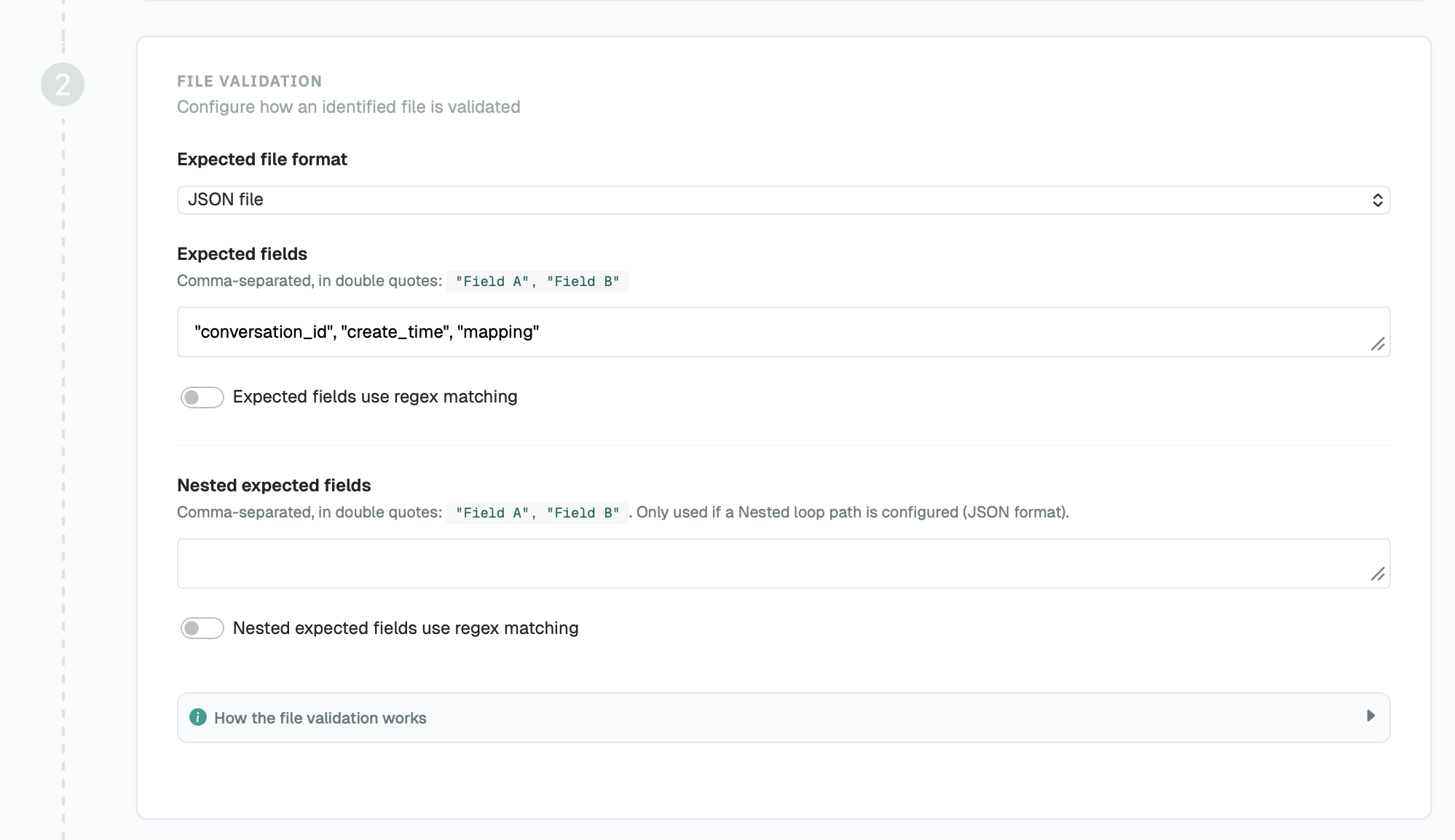
Then you have to let the DDM know what fields the expected file should contain. It should be a .json file and include some of the expected fields that live inside the JSON.
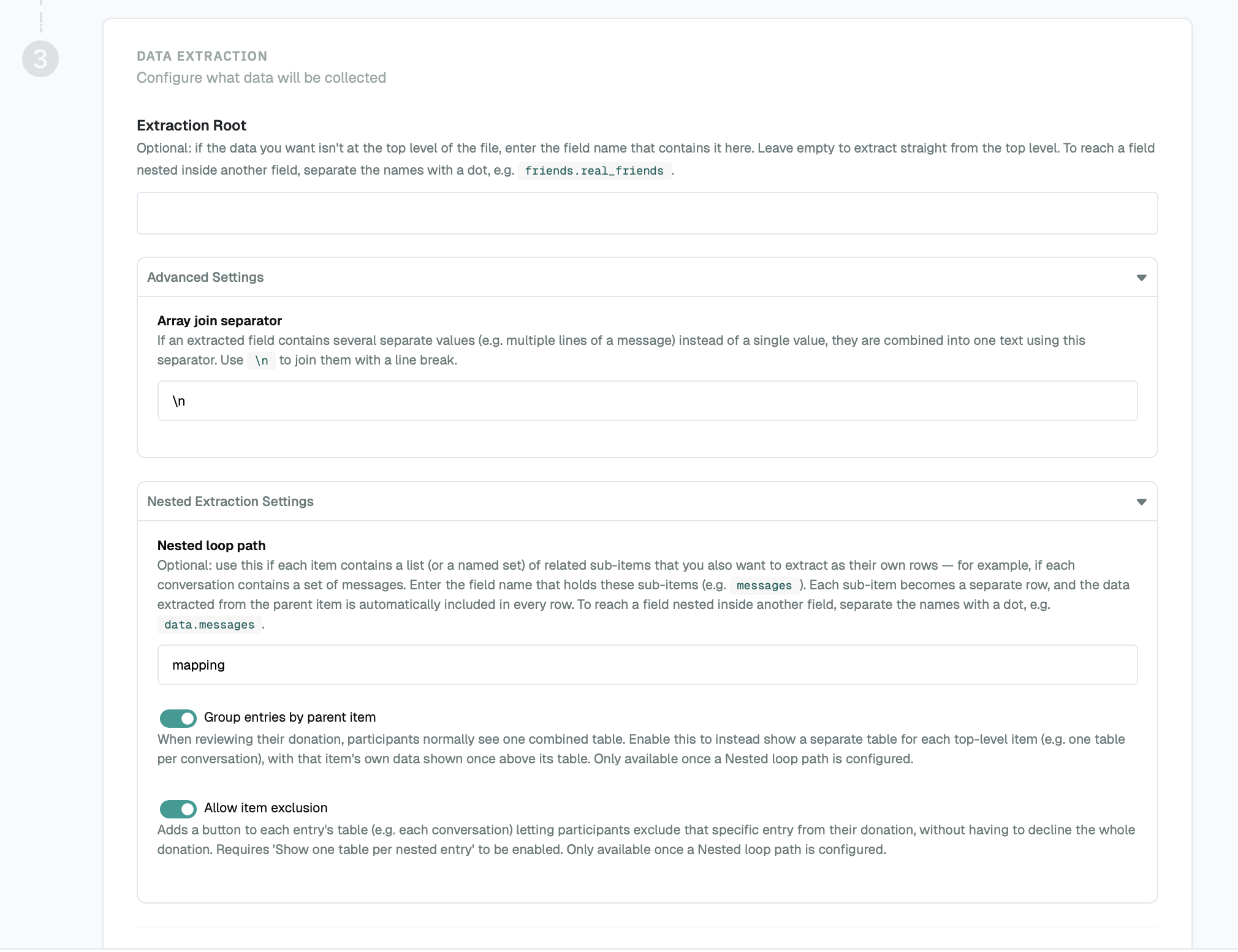
Next, set up the extraction procedure. Because the data is nested, keep the default array join separator and open the Nested Extraction Settings. Enter mapping as the nested loop path, and tick both “Group entries by parent item” and “Allow item exclusion”. This is what lets participants click through their individual chats and choose which ones to donate.
After that is done, you actually define the fields the DDM will extract out of the JSON. Importantly, define both at the root and nested level. You can also rename your fields. This configuration should define and then extract what you actually need from the JSON to analyze the conversations sufficiently.
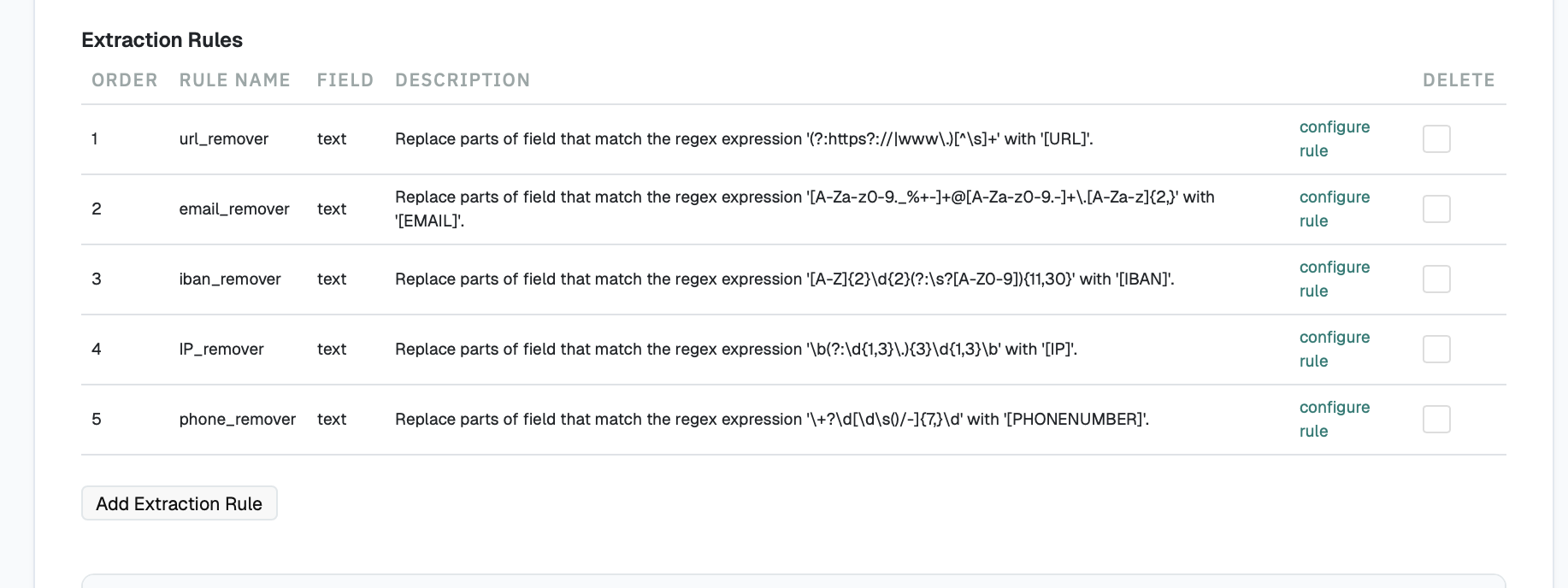
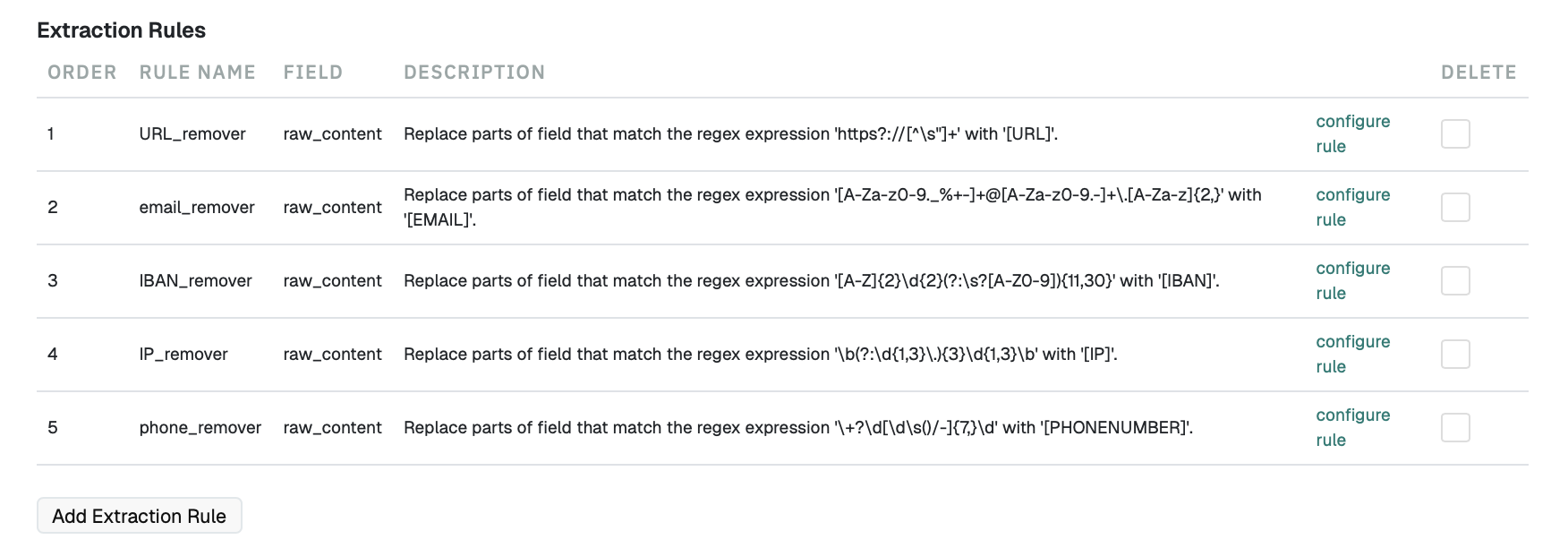
The DDM also offers some preprocessing of the files. The users will see the “cleaned” file already. Because we work inside the “text” field, we can safely regex match and redact both text that contains e-mails and numbers. I would always recommend checking if the regex works and does not overshoot though. Worst case, it could overwrite timestamp numbers. So, check with a test run before you commit to the rules.
Participant view
Character.AI
Because Character.AI is flat, we can’t neatly group messages into conversations. Participants can still see all of their data, but they can’t pick specific conversations to donate or withhold, so it’s an all-or-nothing donation. That’s not ideal, and it’s something you need to state clearly in the briefing and informed consent. Participants could, in principle, edit their own files before donating, but I wouldn’t rely on that: it’s error-prone, and a botched edit can corrupt the file (so I would be careful about recommending that your participants edit their files themselves prior to donating).
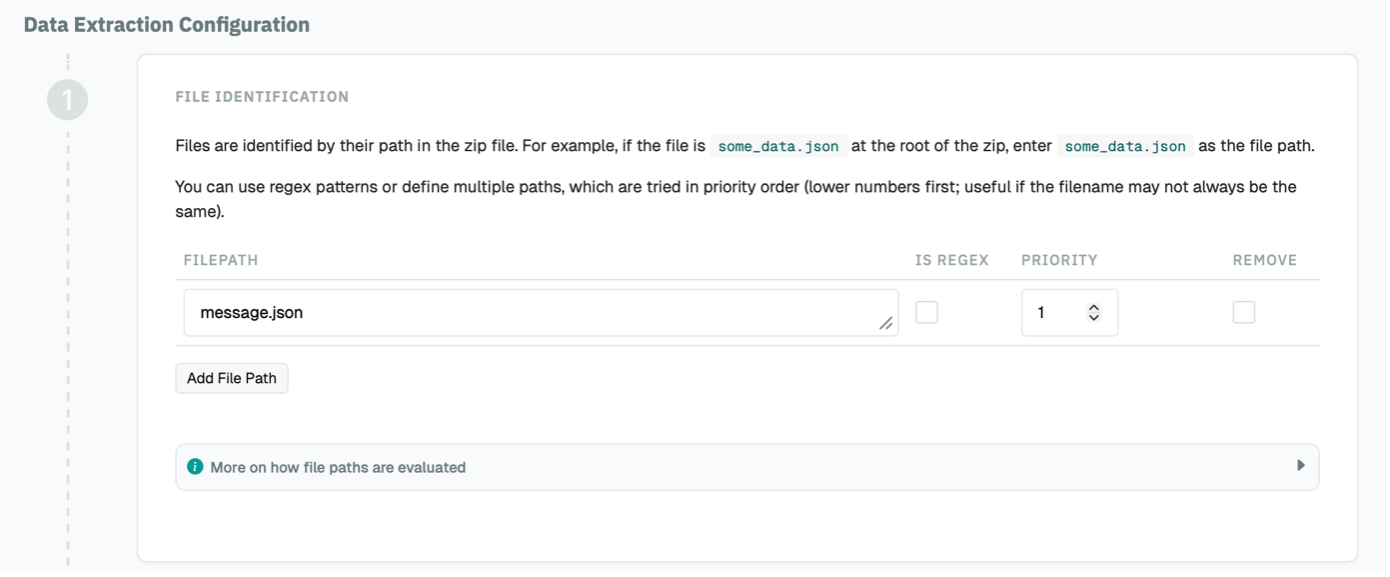
For Character.AI, we again start by defining which file we want out of the .zip. Here, that’s message.json.
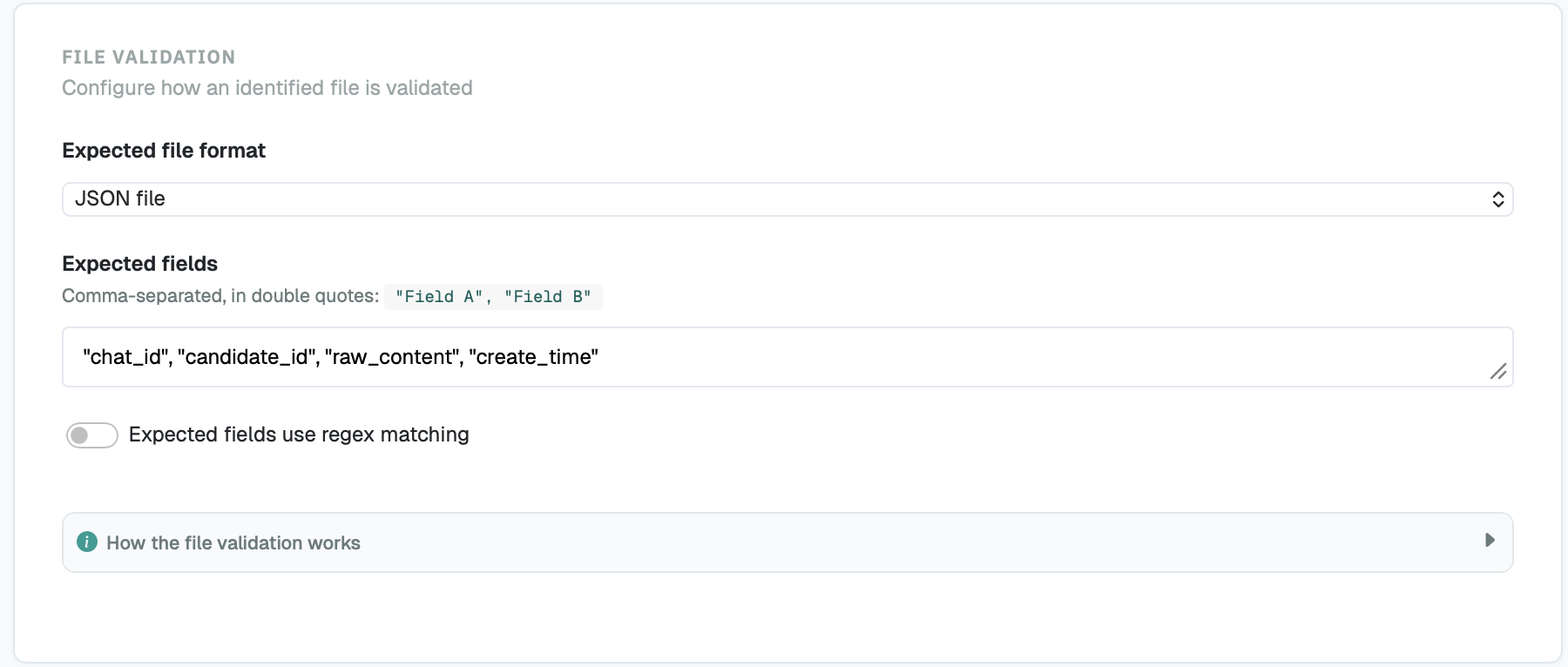
Next, tell the DDM what to expect: set the file type to .json and define the expected fields again. You can copy-paste the ones I used: chat_id, candidate_id, raw_content, create_time.
As I have already mentioned, Character.AI is flat. Therefore, we cannot define any parent/nested extraction.
For the relevant fields, you are working on the root level only. You can copy-paste these fields; it is basically what we need to analyze the conversations.
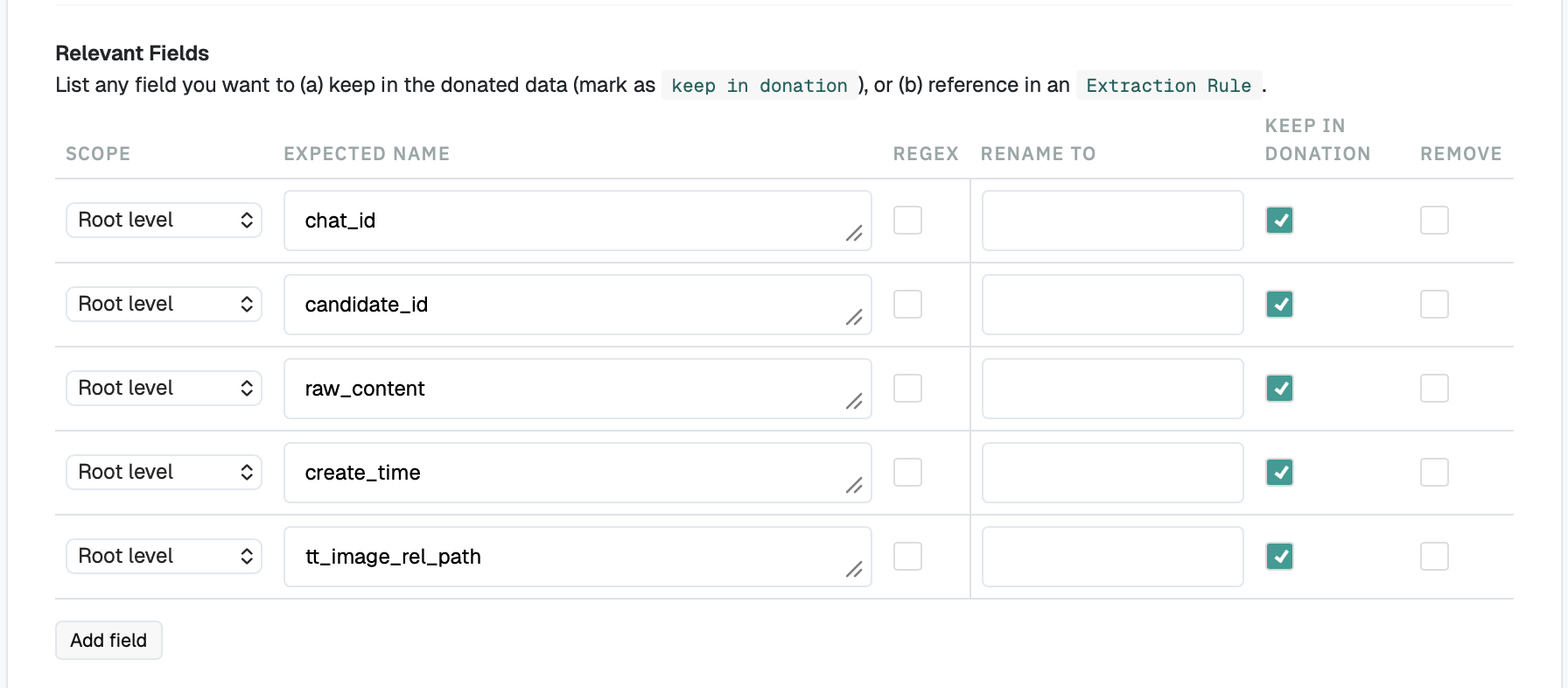
Here the extraction rules act on the root-level fields directly. This is easier than ChatGPT: your regex cleaning only ever touches raw_content, so create_time is never at risk, because there are no timestamps buried inside the text to accidentally corrupt the file.
Participant view
I hope this—probably first-part—tutorial was useful for you. In a following post, I can go into what you should receive once the uploader and blueprint are set up correctly, and how to use an API script to automate the download of the single donations.
If there is anything unclear, or I might have missed or mistaken something, please let me know and shoot me an email!
Best
Nadja
→ back